Showing posts with label MSSQL. Show all posts

Production Database Report: Why choosing proper data type for column is important?

Microsoft SQL Server Report

Database is one of the important part of any web application. Respect the fact that database is much more important than software. However many of you don't care about what data type you are choosing for new column in database table. I've prepared analysis report from production database in Microsoft SQL Server.

Initial Report of Table
Table has 48 columns in it, out of them 16 were with "VARCHAR" data types. Out of 16 column, there were 13 with VARCHAR(MAX). Column names and its initial data types given at the end of the article.

Total Rowcount 17931710
Total Space Occupied Including Index 9319 MB


Steps taken to improve
Step 1: Find the maximum length of value stored in column. SELECT MAX(LENGTH(COLUMN_NAME)) FROM TABLE_NAME.
- Consider a scenario for a column you got Maximum length of value 10,15...20, It means you are storing some predefined status in it and you don't need VARCHAR(MAX)/NVARCHAR(MAX) for it. Discuss with seniors or team member for length of column.
- Perform above step for all column of VARCHAR/NVARCHAR data type. And redesign your table with new length for VARCHAR/NVARCHAR data type column.

Step 2: Create new table with refined data types.

Step 3: Insert data from Old Table to New Table.(Use IDENTITY_INSERT to preserve old ID value of table. Read more https://msdn.microsoft.com/en-us/library/ms188059.aspx)

Step 4: Create existing indices on new table.

Step 5: Delete old table.

Step 6: Rename new table with old/original table name.

I followed the above steps and got the unexpected result. This reports shows the importance of choosing proper data types.

Total Rowcount 17931710
Total Space Occupied without Index 4317 MB
Total Space Occupied with Index 6493 MB
Space occupied by new table 4317(Data) + 2176(Index) = 6493

Previously size of table was 9319 MB with redefined data types its 6493 MB and we've just decreased 2826 MB from table.

Column Name Length New Lenght
****_value max >> max
hash max >> 500
****_status 255 >> 30
sign max >> 500
****_type 255 >> 30
****_message max >> 150
****_value max >> max
****_key max >> 500
****_public_key max >> 500
****_status max >> 20
****_key_before max >> 500
****_key_before_**** max >> 500
****opes max >> 500
****_values max >> 500
****_info max >> 500
currency_**** 1000 >> 500


Note
Currently I'm not sure about altering column size using ALTER. I think its just meta data change, It won't decrease the size of table. I'll test it and let you know the result of it.

Reorganize or Rebuild Indexes to remove fragmentation on database table

Fragmentation
Fragmentation occurs when you perform any INSERTION, UPDATION or DELETION operation against table. Over the time this operation cause to data become scattered in database. Heavily fragmented indexes can degrade query performance and cause your application to respond very slowly.

Note: I'm using sample database(AdventureWorks2008R2) from Microsoft. Change database name and table name where required.

Finding Fragmentation On Table-Index
Execute following query to determine fragmentation on particular table of database.
SELECT ind.name, phy.avg_fragmentation_in_percent, phy.fragment_count, phy.avg_fragment_size_in_pages
FROM sys.dm_db_index_physical_stats(DB_ID(N'AdventureWorks2008R2'), OBJECT_ID(N'HumanResources.Employee'), NULL, NULL, NULL) AS phy
JOIN sys.indexes AS ind
ON phy.object_id = ind.object_id
AND phy.index_id = ind.index_id
Index + REBUILD + REORGANIZE + Detecting Fragmentation + Microsoft SQL Server

As you can see in Image that index 'AK_Employee_LoginID' is Heavily fragmented. It will lead to lower performance of your database.

Column Description
avg_fragmentation_in_percent The percent of logical fragmentation (out-of-order pages in the index).
fragment_count The number of fragments (physically consecutive leaf pages) in the index.
avg_fragment_size_in_pages Average number of pages in one fragment in an index.
Source: http://technet.microsoft.com/

REORGANIZE Index or REBUILD Index?

avg_fragmentation_in_percent value Operation
> 5% and < = 30% ALTER INDEX REORGANIZE
> 30% ALTER INDEX REBUILD WITH (ONLINE = ON)*

What is Index Reorganize?
Database will Reorganize data pages on an index. Reorganizing an index is always executed with online. It means when you perform Reorganize operation on an Index, Database will keep the old index value to serve the incoming queries. When its completed, it'll drop the old index data.

What is Index Rebuild?
Database will drop the current index and create an index from scratch. It comes with two option online and offline. As I said online option will keep the data of old index to serve incoming queries until it completes the rebuild operation. Offline option will drop the old index data right away and create index again, index won't be available until it completes the rebuild operation.

To reorganize an index
ALTER INDEX IX_Employee_OrganizationalLevel_OrganizationalNode ON HumanResources.Employee
REORGANIZE;
To reorganize all indexes in a table
ALTER INDEX ALL ON HumanResources.Employee
REORGANIZE;
To rebuild an index
ALTER INDEX AK_Employee_LoginID ON HumanResources.Employee
REBUILD;
To rebuild all indexes in a table
ALTER INDEX ALL ON HumanResources.Employee
REBUILD WITH (FILLFACTOR = 80, SORT_IN_TEMPDB = ON,
              STATISTICS_NORECOMPUTE = ON);
Warning: This is part of database maintenance so please be carefully while you are dealing with live database server. I'd suggest perform this task under maintenance hours.

Microsoft SQL Server Index: Warning! The maximum key length is 900 bytes.

Today I was creating an Index on columns and got warning from SQL server. I never know that Microsoft SQL Server has put Maximum size limitation on Index key column. I prefer to write SQL script rather design mode of SQL Server Studio. I got warning message in console as follow...

Warning! The maximum key length is 900 bytes. The index 'IndxNc_index_master__MultiCol01' has maximum length of 1000 bytes. For some combination of large values, the insert/update operation will fail.

I did Google for more information and read few articles and also SQL Server library articles. Lets understand warning message with example.

Step 1: First create table. Lets assume below table for the sake of example.
CREATE TABLE [dbo].[index_master](
 [id] [bigint] IDENTITY(1,1) NOT NULL,
 [indexCol1] [nvarchar](450) NULL,
 [indexCol2] [bigint] NULL,
 [indexCol3] [int] NULL,
 [indexCol4] [varchar](442) NULL,
 [indexCol5] [varchar](450) NULL
) ON [PRIMARY]

Step 2: Find out individual column size in bytes.
SELECT name, max_length as size_in_bytes
FROM sys.columns
WHERE OBJECT_NAME(object_id) = 'index_master'

Warning! The maximum key length is 900 bytes


Step 3: Create an index on indexCol2 [8] + indexCol3 [4] + indexCol4 [442] + indexCol5 [450] = 904 bytes.
CREATE NONCLUSTERED INDEX [IndxNc_index_master__MultiCol01] ON [dbo].[index_master] 
(
 [indexCol3] ASC,
 [indexCol4] ASC,
 [indexCol5] ASC,
 [indexCol2] ASC
)WITH (PAD_INDEX  = ON, FILLFACTOR = 80)

/* If you create an index using above script, it'll gives you warning as follow */
/* Warning! The maximum key length is 900 bytes. The index 'IndxNc_index_master__MultiCol01' has maximum length of 904 bytes. For some combination of large values, the insert/update operation will fail.*/

/* If you create an index using SQL Studio design mode, it'll gives you warning as follow */
/* Adding the selected columns will result in an index key with a maximum length of 904 bytes.  The maximum permissible index length is 900 bytes. INSERT and UPDATE operations fail if the combined value of the key columns exceeds 900 bytes. */

Step 4: Lets try to insert record with random data to check what happens if you try cross the limit of 900 bytes.
INSERT INTO index_master values(
'indexCol1',
1234567891012312312,
12345,
'12345678910111213141516171819202122232425262728293031323334353637383940414243444546474849505152535455565758596061626364656667686970717273747576777879808182838485868788899091929394959697989910010110210310410510610710810911011111211311411511611711811912012112212312412512612712812913013113213313413513613713813914014114214314414514614714814915015115215315415515615715815916016116216316416516616716816917017117217317417517617717817918018118218',
'123456789101112131415161718192021222324252627282930313233343536373839404142434445464748495051525354555657585960616263646566676869707172737475767778798081828384858687888990919293949596979899100101102103104105106107108109110111112113114115116117118119120121122123124125126127128129130131132133134135136137138139140141142143144145146147148149150151152153154155156157158159160161162163164165166167168169170171172173174175176177178179180181182183184185186');

It'll throw an error as follow...
Operation failed. The index entry of length 902 bytes for the index 'IndxNc_index_master__MultiCol01' exceeds the maximum length of 900 bytes.

Notes
- If a table column is a Unicode data type such as nchar or nvarchar, then column size in bytes is two times the number of characters specified in the CREATE TABLE statement. Check indexCol1.
- If you have index that exceed the 900 bytes, It'll allow insert/update until unless total sum of key columns not more than 900 bytes. In above insert query cut down long string into small and you'll be able to insert the record without any error.
- You can add big columns in index using INCLUDE clause [except text, ntext, and image datatype columns], SQL Server will not consider included columns for 900 bytes.

Prepared Statement in Microsoft SQL Server

Prepared Statement in Microsoft SQL Server

Database prepares execution plan(steps) for each query fired on it. Preparing execution plan for each query will increase execution cost. To reduce cost on creating execution plan for each query database provides Prepared Statements.

Prepared Statement
Prepared Statements are pre-cached queries stored in database. Prepared Statement used when same query used with different values. Preparing execution plan in advance for particular query will increase query performance.

When, Prepared Statement?
Multiple occurrence of same query with different values will lead to Prepared Statement. Lets understand following queries...
/* Database will prepare two execution plan for following queries */
SELECT * FROM user_master WHERE user_name = 'vicky.thakor'
SELECT * FROM user_master WHERE user_name = 'chirag.thakor'

/* Prepared Statement */
SELECT * FROM user_master WHERE user_name = :param1
- First two queries are simple SQL statement, both are same except its value. For this queries database will prepare two execution plan.
- Third query will be pre-cached query and can accept n number of values and database don't have to prepare execution plan multiple times. Third query template/Prepared Statement used for above two query.

Rule for execution plan
Database will consider space, comma, special symbol while creating execution plan either its Prepared Statement or Simple SQL Query. Database will prepare different execution plan for following queries which seems similar to us but not for database.
/* Execution Plan 1; Comment is part of query*/
/* Native Query */ SELECT * FROM user_master WHERE user_name = 'vicky.thakor'

/* Execution Plan 2; Comment is part of query, We just changed 'q' in comment */
/* Native query */ SELECT * FROM user_master WHERE user_name = 'vicky.thakor'

/* Execution Plan 3 */
SELECT * FROM user_master WHERE user_name = 'vicky.thakor'

/* Execution Plan 4 (Prepared Statement)*/
SELECT * FROM user_master WHERE user_name = :param1

/* Execution Plan 5 (Prepared Statement); Comment is part of query */
/* Prepared Statement */SELECT * FROM user_master WHERE user_name = :param1
So far you noticed how importance of query writing and Prepared Statement. We all are using Prepared Statement from different programming languages, Program just prepare one of the above Prepared Statement and maintain same query structure for all database execution.

Now we will see how you can use Prepared Statements while writing Stored Procedures, functions in Microsoft SQL Server.

Step 1: Clear all available execution plan/Prepared Statements from cache.
DBCC FREEPROCCACHE
DBCC DROPCLEANBUFFERS

Step 2: We will see the execution plan for simple SQL Query
SELECT * FROM user_master WHERE user_name = 'vicky.thakor'
SELECT * FROM user_master WHERE user_name = 'chirag.thakor'

Step 3: Check your execution plan in cache. You will find two execution plan in it.
SELECT usecounts, size_in_bytes, cacheobjtype, text 
FROM sys.dm_exec_cached_plans
CROSS APPLY sys.dm_exec_sql_text(plan_handle)
WHERE cacheobjtype != 'Parse Tree'

Step 4: Now again clear all available execution plan/Prepared Statements from cache.
DBCC FREEPROCCACHE
DBCC DROPCLEANBUFFERS

Step 5: Now we will Prepare Statement in Database. Execute following query two times with different values. Change your table name, column name and value.
EXEC sp_executesql
@statement = N'SELECT * FROM user_master WHERE user_name = @param1',
@parameters = N'@param1 varchar(100)',
@param1 = N'vicky.thakor'

Step 6: Check your execution plan in cache. You will notice that same execution plan used twice.
SELECT usecounts, size_in_bytes, cacheobjtype, text 
FROM sys.dm_exec_cached_plans
CROSS APPLY sys.dm_exec_sql_text(plan_handle)
WHERE cacheobjtype != 'Parse Tree'

Microsoft SQL Server: Optimize for ad-hoc workloads Explained!


SQL Server maintains cache for execution plan. This cache maintained to optimize query performance. Each query has its own execution plan stored in memory. It will lead to memory overhead for SQL Server. It will also be suppression to find exact execution. We need to cache only those queries which executed multiple times.

Optimize for ad-hoc workloads
"optimize for ad hoc workloads" option helps to cache only those execution plan(Query) in memory which executed multiple times. This option comes with two flag 1 [TRUE] and 0 [FALSE]

  • 1 [TRUE] - Turn on the cache optimization. 
  • 0 [FALSE] - Turn off the cache optimization.

Cache Object Type
There are several other types of object for cache but will focus only on two "Compiled Plan" and "Compiled Plan Stub".

  • Compiled Plan: This object holds full execution plan in cache.
  • Compiled Plan Stub: This object holds stub (end point) of execution plan.

Download Microsoft's sample database
I'm using AdventureWorks2008R2 Database for example.
Link: http://msftdbprodsamples.codeplex.com/releases/view/93587.


Queries in Action

First of all lets find how much memory occupied in cache. 
/* Get memory used for execution plan cache */
SELECT SUM(size_in_bytes)/1024.0/1024.0 AS [Total MB used]
FROM sys.dm_exec_cached_plans
CROSS APPLY sys.dm_exec_sql_text(plan_handle)

To understand the real time example lets turn off "optimize for ad hoc workloads" option and clear all execution plan from cache.
EXECUTE sp_configure 'optimize for ad hoc workloads', 0
RECONFIGURE
GO

DBCC FREEPROCCACHE
DBCC DROPCLEANBUFFERS
GO

Now execute simple select query on database and generate execution plan cache.
SELECT * FROM HumanResources.Employee

To check query execution plan cache execute below query.
SELECT usecounts, size_in_bytes, cacheobjtype, text
FROM sys.dm_exec_cached_plans
CROSS APPLY sys.dm_exec_sql_text(plan_handle)
WHERE cacheobjtype != 'Parse Tree'

optimize for ad-hoc workloads Micosoft SQL Server

Explanation
When you disable/turn off "optimize for ad hoc workloads" option, cache will stores whole execution plan regardless query will be used in future or not. This will create memory overhead. Lets see the counter part of this option.


Now clear all execution plan cache and enable/turn on "optimize for ad hoc workloads" option.
EXECUTE sp_configure 'optimize for ad hoc workloads', 1
RECONFIGURE
GO

DBCC FREEPROCCACHE
DBCC DROPCLEANBUFFERS
GO

Execute same query and check the execution plan cache. Execute both the query separately.
SELECT * FROM HumanResources.Employee

SELECT usecounts, size_in_bytes, cacheobjtype, text
FROM sys.dm_exec_cached_plans
CROSS APPLY sys.dm_exec_sql_text(plan_handle)
WHERE cacheobjtype != 'Parse Tree'

optimize for ad-hoc workloads Micosoft SQL Server

Explanation
When you enable/turn on "optimize for ad hoc workloads" option, SQL server only store Compiled Plan Stub of query which executed once. If you fire same query again then SQL Server get to know that this query already executed once so it will remove Compiled Plan Stub from memory and replace it with Compiled Plan.

optimize for ad-hoc workloads Micosoft SQL Server


Database ORDER BY on two columns

ORDER BY two column_Microsoft_SQL_Server_MySQL

ORDER BY 
ORDER BY is used in database to sort data in Ascending or Descending order. ORDER BY keyword is available in all across different database platforms. It comes with two option ASC and DESC. If you don't apply order pattern(ASC or DESC) then it'll take ASC as default pattern.

Microsoft SQL Server and MySQL (Ascending) : SELECT * FROM user_master ORDER BY user_name
Microsoft SQL Server and MySQL (Descending) : SELECT * FROM user_master ORDER BY user_name DESC

I tested ORDER BY on two columns in Microsoft SQL Server and MySQL. You can share for other database platform.

Microsoft SQL Server Start up scripts
/* MSSQL tables and Insert queries */
/****** Object:  Table [dbo].[post]    Script Date: 05/22/2014 17:25:18 ******/
CREATE TABLE [dbo].[post](
 [id] [int] IDENTITY(1,1) NOT NULL,
 [post] [varchar](max) NULL
) ON [PRIMARY]
GO
SET IDENTITY_INSERT post ON;
INSERT [dbo].[post] ([id], [post]) VALUES (1, N'Post 1')
INSERT [dbo].[post] ([id], [post]) VALUES (2, N'Post 2')
SET IDENTITY_INSERT post OFF;

/****** Object:  Table [dbo].[comments]    Script Date: 05/22/2014 17:25:18 ******/
CREATE TABLE [dbo].[comments](
 [id] [int] IDENTITY(1,1) NOT NULL,
 [comment] [varchar](max) NULL,
 [postID] [int] NOT NULL
) ON [PRIMARY]
GO
SET IDENTITY_INSERT comments ON;
INSERT [dbo].[comments] ([id], [comment], [postID]) VALUES (1, N'comment 1 of 1', 1)
INSERT [dbo].[comments] ([id], [comment], [postID]) VALUES (2, N'comment 2 of 1', 1)
INSERT [dbo].[comments] ([id], [comment], [postID]) VALUES (3, N'comment 1 of 2', 2)
INSERT [dbo].[comments] ([id], [comment], [postID]) VALUES (4, N'comment 2 of 2', 2)
INSERT [dbo].[comments] ([id], [comment], [postID]) VALUES (5, N'comment 3 of 2', 2)
SET IDENTITY_INSERT comments OFF;

MySQL Start up scripts
/* MySQL tables and Insert queries */
/****** Object:  Table post    Script Date: 05/22/2014 17:25:18 ******/
CREATE TABLE `post` (
  `id` int(11) NOT NULL AUTO_INCREMENT,
  `post` varchar(100) COLLATE utf8_unicode_ci NOT NULL,
  PRIMARY KEY (`id`)
) ENGINE=InnoDB AUTO_INCREMENT=3 DEFAULT CHARSET=utf8 COLLATE=utf8_unicode_ci;
INSERT post (id, post) VALUES (1, 'Post 1');
INSERT post (id, post) VALUES (2, 'Post 2');

/****** Object:  Table comments    Script Date: 05/22/2014 17:25:18 ******/
CREATE TABLE `comments` (
  `id` int(11) NOT NULL AUTO_INCREMENT,
  `comment` varchar(100) COLLATE utf8_unicode_ci NOT NULL,
  `postID` varchar(100) COLLATE utf8_unicode_ci NOT NULL,
  PRIMARY KEY (`id`)
) ENGINE=InnoDB AUTO_INCREMENT=6 DEFAULT CHARSET=utf8 COLLATE=utf8_unicode_ci;
INSERT comments (id, comment, postID) VALUES (1, 'comment 1 of 1', 1);
INSERT comments (id, comment, postID) VALUES (2, 'comment 2 of 1', 1);
INSERT comments (id, comment, postID) VALUES (3, 'comment 1 of 2', 2);
INSERT comments (id, comment, postID) VALUES (4, 'comment 2 of 2', 2);
INSERT comments (id, comment, postID) VALUES (5, 'comment 3 of 2', 2);

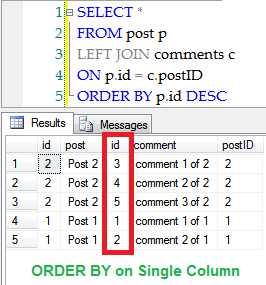
ORDER BY on Single Column
SELECT *
FROM post p
LEFT JOIN comments c
ON p.id = c.postID
ORDER BY p.id DESC;

ORDER BY on Two Columns
SELECT *
FROM post p
LEFT JOIN comments c
ON p.id = c.postID
ORDER BY p.id DESC, c.id DESC;

  • You can't apply ORDER BY on two columns within same table. If you apply ORDER BY on same table. It'll take last column name and apply ORDER BY pattern on it.

Custom Table Schema for Microsoft SQL Server

Now a days I'm working lot on database. I took switch for a while to learn basics of database. For my convenience I created Microsoft SQL Server Stored Procedure that helps us to find all constraints on table in one shot.

Microsoft SQL Management Studio also provide same data but display in multiple tables. I merged all that data in one single table so that data can be easily copied to Microsoft Excel or Google sheet. It also provide option to find column level constraints.

Execute below Stored Procedure in your Microsoft SQL Server... Or You can download same SQL script from here

SET ANSI_NULLS ON
SET QUOTED_IDENTIFIER ON
IF(OBJECT_ID('usp_TableSchema') IS NOT NULL)
 DROP PROCEDURE usp_TableSchema;
GO
CREATE PROCEDURE usp_TableSchema
@TableName varchar(200),
@ColumnName varchar(200)
AS
BEGIN
 /**
  * @author javaQuery
  * @date 7th May, 2014
  * www.javaquery.com
  */
 /* Variable declaration */
 DECLARE @CURSOR_LOOP_ON_COLUMN CURSOR;
 DECLARE @GET_COLUMN_NAME VARCHAR(200);
 DECLARE @GET_COLUMN_DATA_TYPE VARCHAR(200);
 
 DECLARE @CURSOR_LOOP_ON_INDEX CURSOR;
 DECLARE @GET_INDEX_NAME VARCHAR(200);
 DECLARE @GET_INDEX_INCLUDED VARCHAR(200);
 DECLARE @COUNT INT = 1;

 DECLARE @CURSOR_LOOP_ON_FK CURSOR;
 DECLARE @GET_FK_TABLE_NAME VARCHAR(200);
 DECLARE @GET_FK_COLUMN_NAME VARCHAR(200);
 DECLARE @GET_FK_CONSTRAINT_NAME VARCHAR(200);

 DECLARE @GET_INDEX_COUNT INT;
 DECLARE @GET_FK_COUNT INT;
 DECLARE @CURRENT_FK_INDEX INT;

 /* Temporary table to hold final records */
 CREATE TABLE #TABLE_SCHEMA
 ( 
  COLUMN_NAME VARCHAR(200),
  COLUMN_TYPE VARCHAR(200),
  PK VARCHAR(5),
  PK_CONSTRAINT_NAME VARCHAR(200),
  UNIQUE_KEY VARCHAR(5),
  UNIQUE_KEY_NAME VARCHAR(200),
  DF_CONSTRAINT_NAME VARCHAR(200),
  DF_CONSTRAINT_VALUE VARCHAR(200),
  FK_CONSTRAINT_ON_COLUMN VARCHAR(200),
  FK_REFERENCE_TABLE VARCHAR(200),
  FK_REFERENCE_COLUMN VARCHAR(200),
  COLUMN_AS_FK_ON_TABLE VARCHAR(200),
  COLUMN_AS_FK_ON_TABLE_COLUMN VARCHAR(200),
  COLUMN_AS_FK_CONSTRAINT_NAME VARCHAR(200),
  IDX_NAME VARCHAR(200),
  IDX_COLUMN_INCLUDED VARCHAR(5),
  SEARCH_COLUMN VARCHAR(200)
 ); 

 /* Temporary table to hold 'PRIMARY KEY CONSTRAINTS' */
 CREATE TABLE #PK_CONSTRAINT
 (
  PK_COLUMN_NAME VARCHAR(200),
  PK_CONSTRAINT_NAME VARCHAR(200)
 );
 
 /* Fetch all Primary keys on table */
 INSERT INTO #PK_CONSTRAINT(PK_COLUMN_NAME,PK_CONSTRAINT_NAME)
 SELECT COLUMN_NAME, tc.CONSTRAINT_NAME 
 FROM INFORMATION_SCHEMA.TABLE_CONSTRAINTS tc
 INNER JOIN INFORMATION_SCHEMA.KEY_COLUMN_USAGE kcu
 ON tc.CONSTRAINT_TYPE = 'PRIMARY KEY'
 AND tc.CONSTRAINT_NAME = kcu.CONSTRAINT_NAME
 AND kcu.TABLE_NAME = @TableName
 ORDER BY kcu.ORDINAL_POSITION

 /* Temporary table to hold 'UNIQUE KEY CONSTRAINTS' */
 CREATE TABLE #UNIQUE_KEY
 (
  UN_COLUMN_NAME VARCHAR(200),
  UN_CONSTRAINT_NAME VARCHAR(200)
 );
 
 /* Fetch all Unique keys on table */
 INSERT INTO #UNIQUE_KEY(UN_COLUMN_NAME, UN_CONSTRAINT_NAME)
 SELECT COLUMN_NAME, tc.CONSTRAINT_NAME 
 FROM INFORMATION_SCHEMA.TABLE_CONSTRAINTS tc
 INNER JOIN INFORMATION_SCHEMA.KEY_COLUMN_USAGE kcu
 ON tc.CONSTRAINT_TYPE = 'UNIQUE'
 AND tc.CONSTRAINT_NAME = kcu.CONSTRAINT_NAME
 AND kcu.TABLE_NAME = @TableName
 ORDER BY kcu.ORDINAL_POSITION

 /* Temporary table to hold 'DEFAULT CONSTRAINTS' */
 CREATE TABLE #DF_CONSTRAINT
 (
  DF_COLUMN_NAME VARCHAR(200),
  DF_CONSTRAINT_NAME VARCHAR(200),
  DF_CONSTRAINT_VALUE VARCHAR(200)
 );
 
 /* Fetch all default constraints on table */
 INSERT INTO #DF_CONSTRAINT (DF_COLUMN_NAME, DF_CONSTRAINT_NAME, DF_CONSTRAINT_VALUE)
 SELECT col.name, df.name, definition 
 FROM sys.columns col
 LEFT JOIN sys.default_constraints df
 ON col.default_object_id = df.object_id
 WHERE OBJECT_NAME(col.object_id) = @TableName
 AND OBJECT_NAME(df.parent_object_id) = @TableName;
 
 /* Temporary table to hold 'FOREIGN KEY CONSTRAINTS' */
 CREATE TABLE #FK_CONSTRAINT_CURRENT_COLUMN
 (
  COLUMN_NAME VARCHAR(200),
  FK_CUURENT_TABLE_NAME VARCHAR(200),
  FK_CURRENT_COLUMN_NAME VARCHAR(200),
  FK_CURRENT_CONSTRAINT_NAME VARCHAR(200)
 );
 
 /* Find all referencing Foreign key constraints on table */
 INSERT INTO #FK_CONSTRAINT_CURRENT_COLUMN (COLUMN_NAME, FK_CUURENT_TABLE_NAME,FK_CURRENT_COLUMN_NAME, FK_CURRENT_CONSTRAINT_NAME)
 SELECT col1.name, tab2.name, col2.name, obj.name
 FROM sys.foreign_key_columns fkc
 INNER JOIN sys.objects obj
  ON obj.object_id = fkc.constraint_object_id
 INNER JOIN sys.tables tab1
  ON tab1.object_id = fkc.parent_object_id
 INNER JOIN sys.columns col1
  ON col1.column_id = parent_column_id AND col1.object_id = tab1.object_id
 INNER JOIN sys.tables tab2
  ON tab2.object_id = fkc.referenced_object_id
 INNER JOIN sys.columns col2
  ON col2.column_id = referenced_column_id AND col2.object_id = tab2.object_id
 WHERE tab1.name = @TableName
 
 /* Temporary table to hold 'FOREIGN KEY CONSTRAINTS' */
 CREATE TABLE #FK_CONSTRAINT
 (
  ID numeric(19, 0) IDENTITY(1,1) NOT NULL,
  COLUMN_NAME VARCHAR(200),
  FK_TABLE_NAME VARCHAR(200),
  FK_COLUMN_NAME VARCHAR(200),
  FK_CONSTRAINT_NAME VARCHAR(200)
 );
 
 /* Find all referencing Foreign key constraints on table */
 INSERT INTO #FK_CONSTRAINT (COLUMN_NAME, FK_TABLE_NAME,FK_COLUMN_NAME, FK_CONSTRAINT_NAME)
 SELECT col2.name, tab1.name, col1.name, obj.name
 FROM sys.foreign_key_columns fkc
 INNER JOIN sys.objects obj
  ON obj.object_id = fkc.constraint_object_id
 INNER JOIN sys.tables tab1
  ON tab1.object_id = fkc.parent_object_id
 INNER JOIN sys.columns col1
  ON col1.column_id = parent_column_id AND col1.object_id = tab1.object_id
 INNER JOIN sys.tables tab2
  ON tab2.object_id = fkc.referenced_object_id
 INNER JOIN sys.columns col2
  ON col2.column_id = referenced_column_id AND col2.object_id = tab2.object_id
 WHERE tab2.name = @TableName
 
 /* Temporary table to hold 'INDICES' */
 CREATE TABLE #COLUMN_INDICES
 (
  ID numeric(19, 0) IDENTITY(1,1) NOT NULL,
  INDEX_COLUMN_NAME VARCHAR(200),
  INDEX_NAME VARCHAR(200),
  INDEX_COLUMN_INCLUDED VARCHAR(5)
 );
 
 /* Loop through each column name */
 SET @CURSOR_LOOP_ON_COLUMN = CURSOR FOR SELECT COLUMN_NAME, DATA_TYPE
           FROM INFORMATION_SCHEMA.COLUMNS
           WHERE TABLE_NAME = @TableName
           ORDER BY ORDINAL_POSITION;
 OPEN @CURSOR_LOOP_ON_COLUMN
  FETCH NEXT
   FROM @CURSOR_LOOP_ON_COLUMN INTO @GET_COLUMN_NAME, @GET_COLUMN_DATA_TYPE
   WHILE @@FETCH_STATUS = 0
   BEGIN 
    /* Fetch all indices on column */
    INSERT INTO #COLUMN_INDICES (INDEX_COLUMN_NAME, INDEX_NAME, INDEX_COLUMN_INCLUDED)
    SELECT DISTINCT c.name, ind.name, CASE WHEN ic.is_included_column = 0 THEN 'NO' WHEN ic.is_included_column != 0 THEN 'YES' END
    FROM sys.indexes ind
    RIGHT JOIN sys.tables t
    ON ind.object_id = t.object_id
    RIGHT JOIN sys.columns c
    ON t.object_id = c.object_id
    RIGHT JOIN sys.index_columns ic
    ON ind.index_id = ic.index_id
    AND c.column_id = ic.column_id
    WHERE ind.is_primary_key = 0
    AND ind.is_unique_constraint = 0
    AND t.is_ms_shipped = 0
    AND ind.name is not null
    AND ind.is_unique in (0,1)
    AND t.name = @TableName
    AND c.name = @GET_COLUMN_NAME
    AND OBJECT_NAME(ic.object_id) = @TableName;
    
    /* Fill up record table */
    INSERT INTO #TABLE_SCHEMA
      (COLUMN_NAME, COLUMN_TYPE, PK, PK_CONSTRAINT_NAME, UNIQUE_KEY, UNIQUE_KEY_NAME
      ,DF_CONSTRAINT_NAME, DF_CONSTRAINT_VALUE, FK_CONSTRAINT_ON_COLUMN, FK_REFERENCE_TABLE, FK_REFERENCE_COLUMN,
      COLUMN_AS_FK_ON_TABLE, COLUMN_AS_FK_ON_TABLE_COLUMN, COLUMN_AS_FK_CONSTRAINT_NAME, IDX_NAME, IDX_COLUMN_INCLUDED,
      SEARCH_COLUMN)
    SELECT @GET_COLUMN_NAME,
        @GET_COLUMN_DATA_TYPE,
        CASE WHEN (SELECT COUNT(*) FROM #PK_CONSTRAINT WHERE PK_COLUMN_NAME = @GET_COLUMN_NAME) > 0 THEN 'YES' END,
        (SELECT PK_CONSTRAINT_NAME FROM #PK_CONSTRAINT WHERE PK_COLUMN_NAME = @GET_COLUMN_NAME),
        CASE WHEN (SELECT COUNT(*) FROM #UNIQUE_KEY WHERE UN_COLUMN_NAME = @GET_COLUMN_NAME) > 0 THEN 'YES' END,
        (SELECT UN_CONSTRAINT_NAME FROM #UNIQUE_KEY WHERE UN_COLUMN_NAME = @GET_COLUMN_NAME),
        (SELECT DF_CONSTRAINT_NAME FROM #DF_CONSTRAINT WHERE DF_COLUMN_NAME = @GET_COLUMN_NAME),
        (SELECT DF_CONSTRAINT_VALUE FROM #DF_CONSTRAINT WHERE DF_COLUMN_NAME = @GET_COLUMN_NAME),
        (SELECT FK_CURRENT_CONSTRAINT_NAME FROM #FK_CONSTRAINT_CURRENT_COLUMN WHERE COLUMN_NAME = @GET_COLUMN_NAME),
        (SELECT FK_CUURENT_TABLE_NAME FROM #FK_CONSTRAINT_CURRENT_COLUMN WHERE COLUMN_NAME = @GET_COLUMN_NAME),
        (SELECT FK_CURRENT_COLUMN_NAME FROM #FK_CONSTRAINT_CURRENT_COLUMN WHERE COLUMN_NAME = @GET_COLUMN_NAME),
        (SELECT TOP 1 FK_TABLE_NAME FROM #FK_CONSTRAINT WHERE COLUMN_NAME = @GET_COLUMN_NAME),
        (SELECT TOP 1 FK_COLUMN_NAME FROM #FK_CONSTRAINT WHERE COLUMN_NAME = @GET_COLUMN_NAME),
        (SELECT TOP 1 FK_CONSTRAINT_NAME FROM #FK_CONSTRAINT WHERE COLUMN_NAME = @GET_COLUMN_NAME),
        (SELECT TOP 1 INDEX_NAME FROM #COLUMN_INDICES WHERE INDEX_COLUMN_NAME = @GET_COLUMN_NAME),
        (SELECT TOP 1 INDEX_COLUMN_INCLUDED FROM #COLUMN_INDICES WHERE INDEX_COLUMN_NAME = @GET_COLUMN_NAME),
        @GET_COLUMN_NAME;
    
    SELECT @GET_FK_COUNT = COUNT(*) FROM #FK_CONSTRAINT WHERE COLUMN_NAME = @GET_COLUMN_NAME;
    SELECT TOP 1 @CURRENT_FK_INDEX = ID FROM #FK_CONSTRAINT WHERE COLUMN_NAME = @GET_COLUMN_NAME;
    SELECT @GET_INDEX_COUNT = COUNT(*) FROM #COLUMN_INDICES WHERE INDEX_COLUMN_NAME = @GET_COLUMN_NAME;
    
    /* Below logic is to fiil up Foreign key and index in one row */    
    SET @COUNT = 1;
        
    WHILE (@COUNT < @GET_INDEX_COUNT)
    BEGIN
     SET @GET_FK_TABLE_NAME = NULL;
     SET @GET_FK_COLUMN_NAME = NULL;
     SET @GET_FK_CONSTRAINT_NAME = NULL;
    
     SELECT TOP 1 @CURRENT_FK_INDEX = ID, @GET_FK_TABLE_NAME = FK_TABLE_NAME, 
         @GET_FK_COLUMN_NAME = FK_COLUMN_NAME, @GET_FK_CONSTRAINT_NAME = FK_CONSTRAINT_NAME
     FROM #FK_CONSTRAINT 
     WHERE ID > @CURRENT_FK_INDEX AND COLUMN_NAME = @GET_COLUMN_NAME;
        
     INSERT INTO #TABLE_SCHEMA 
       (COLUMN_NAME, COLUMN_TYPE, COLUMN_AS_FK_ON_TABLE, COLUMN_AS_FK_ON_TABLE_COLUMN, COLUMN_AS_FK_CONSTRAINT_NAME
       ,IDX_NAME, IDX_COLUMN_INCLUDED, SEARCH_COLUMN)
     SELECT TOP 1 '', '', @GET_FK_TABLE_NAME, @GET_FK_COLUMN_NAME, @GET_FK_CONSTRAINT_NAME
        ,INDEX_NAME, INDEX_COLUMN_INCLUDED, @GET_COLUMN_NAME
     FROM #COLUMN_INDICES 
     WHERE ID > @COUNT 
     AND INDEX_COLUMN_NAME = @GET_COLUMN_NAME;
     
     SET @COUNT = @COUNT + 1;
    END   
        
    IF(@GET_FK_COUNT > @GET_INDEX_COUNT)
    BEGIN
     SET @COUNT = 1;
     WHILE(@COUNT < @CURRENT_FK_INDEX)
     BEGIN
      SET @COUNT = @CURRENT_FK_INDEX;
           
      INSERT INTO #TABLE_SCHEMA 
        (COLUMN_NAME, COLUMN_TYPE, COLUMN_AS_FK_ON_TABLE, COLUMN_AS_FK_ON_TABLE_COLUMN, COLUMN_AS_FK_CONSTRAINT_NAME, SEARCH_COLUMN)
      SELECT TOP 1 '', '', FK_TABLE_NAME, FK_COLUMN_NAME, FK_CONSTRAINT_NAME, @GET_COLUMN_NAME
      FROM #FK_CONSTRAINT 
      WHERE ID > @CURRENT_FK_INDEX 
      AND COLUMN_NAME = @GET_COLUMN_NAME;
      
      SELECT TOP 1 @CURRENT_FK_INDEX = ID 
      FROM #FK_CONSTRAINT 
      WHERE ID > @CURRENT_FK_INDEX AND COLUMN_NAME = @GET_COLUMN_NAME;
     END
     
    END
    
    /* Flush all records from #COLUMN_INDICES table */
    TRUNCATE TABLE #COLUMN_INDICES;
      
    FETCH NEXT
    FROM @CURSOR_LOOP_ON_COLUMN INTO @GET_COLUMN_NAME, @GET_COLUMN_DATA_TYPE
   END
 CLOSE @CURSOR_LOOP_ON_COLUMN
 DEALLOCATE @CURSOR_LOOP_ON_COLUMN
 
 IF(@ColumnName IS NOT NULL AND @ColumnName != '')
 BEGIN
    SELECT COLUMN_NAME, COLUMN_TYPE, PK, PK_CONSTRAINT_NAME, UNIQUE_KEY, UNIQUE_KEY_NAME
       ,DF_CONSTRAINT_NAME, DF_CONSTRAINT_VALUE, FK_CONSTRAINT_ON_COLUMN, FK_REFERENCE_TABLE, FK_REFERENCE_COLUMN,
       COLUMN_AS_FK_ON_TABLE, COLUMN_AS_FK_ON_TABLE_COLUMN, COLUMN_AS_FK_CONSTRAINT_NAME, IDX_NAME, IDX_COLUMN_INCLUDED
    FROM #TABLE_SCHEMA 
   WHERE SEARCH_COLUMN = @ColumnName; 
 END
 ELSE
 BEGIN
    SELECT COLUMN_NAME, COLUMN_TYPE, PK, PK_CONSTRAINT_NAME, UNIQUE_KEY, UNIQUE_KEY_NAME
       ,DF_CONSTRAINT_NAME, DF_CONSTRAINT_VALUE, FK_CONSTRAINT_ON_COLUMN, FK_REFERENCE_TABLE, FK_REFERENCE_COLUMN,
       COLUMN_AS_FK_ON_TABLE, COLUMN_AS_FK_ON_TABLE_COLUMN, COLUMN_AS_FK_CONSTRAINT_NAME, IDX_NAME, IDX_COLUMN_INCLUDED 
    FROM #TABLE_SCHEMA; 
 END
END

Execute usp_TableSchema
usp_TableSchema accepts two arguments @TableName, @ColumnName

  • To get table level constraints fire this command exec usp_TableSchema 'table_name', ''
  • To get constraints on particular column fire this command exec usp_TableSchema 'table_name', 'column_name'

Click to enlarge

Microsoft SQL Studio Management Shortcut
Select TableName and press Alt + F1

How to connect Microsoft SQL Server from Java?

Now a days all major applications in Java using Hibernate to support multiple dialect. However Today I'm going to post an article "Connecting Microsoft SQL Server using Java code" by using SQL Server library.

Change credential in below code and test your connection to Microsoft SQL Server
import java.sql.Connection;
import java.sql.DriverManager;
import java.sql.PreparedStatement;
import java.sql.ResultSet;

/**
 * @author javaQuery
 * This program demonstrate connection between Java and Microsoft SQL Server.
 */
public class MSSQLConnect {

    public static void main(String[] args) {
        /**
         * Driver to connect database.
         * Database credentials.
         */
        String driver = "com.microsoft.sqlserver.jdbc.SQLServerDriver";
        String url = "jdbc:sqlserver://127.0.0.1:1433;DatabaseName=javaQuery";
        String username = "sa";
        String password = "airborne";
        try {
            /* Load database driver */
            Class.forName(driver);
            /* Establish database connection */
            Connection con = DriverManager.getConnection(url, username, password);
            /* Run query */
            PreparedStatement stmt = con.prepareStatement("select * from user_master");
            /* Get return result */
            ResultSet resultset = stmt.executeQuery();
            /* Loop through every row  */
            while (resultset.next()) {
                System.out.println(resultset.getString("Firstname")+" "+resultset.getString("Lastname"));
            }
            /* Close result set */
            resultset.close();
            /* Close database connection */
            con.close();
        } catch (Exception e) {
            e.printStackTrace();
        }
    }
}
Download Microsoft SQL Server API from here http://goo.gl/HT6HA6

MSSQL: Queries that do not return large result sets. Nonclustered Index limitation

What is Nonclustered Index?
A nonclustered index contains the index key values and row locators that point to the storage location of the table data.

Queries that do not return large result sets. - Nonclustered Index Design Guidelines
Source: http://technet.microsoft.com/en-us/library/ms179325(v=sql.105).aspx

We are using hibernate in our project to support multiple dialect. Its our routine process to get queries that are generated by hibernate. We do analysis on that queries and suggest indexes and other stuffs. We replaced ? in query with 0. We fired that query in Microsoft SQL Server Management Studio and Execution plan suggested index. We created index with bit modification. After executing same query again what we see is index is not used by query.

We were clueless why is database not using index. We went through lots of article but no one wrote specifically for this rule of nonclustered index. We did few more run on different tables and queries. We were not able to derive perfect rule that...

Database will not use Nonclustered Index when Its returning 'n' records.
It's yet to be discovered from my side. If you guys have perfect rule for this do share in comment. I'll put here if its really a case.

Case Scenario:
SELECT * 
FROM s_master this_ 
LEFT OUTER JOIN t_master tlist2_ 
ON this_.id = tlist2_.s_id 
WHERE this_.document_id = 0 
AND this_.library_id = 0
This query returned 2248 records and as Microsoft SQL server design guide line suggests, query won't use index. We replaced 0 with specific value and It started using Index.

Conclusion:
Nonclustered Index is only useful when you are sure that your query won't return much records.

You'd like to read more about index, scroll through this articles...

MSSQL: How to find all database indexes on column?

I was playing with MSSQL system tables for fun and popup one thing that lets try to find all indexes on column. I ended up with one long query so thought let me post it and you guys don't have work for this query again.

Professionals I don't have to explain much about these tables. Beginner try to work around this table. It'll help you lot in future, way to become database expert in other word Database Administrator(DBA).

/* Change table name and column name in where condition */
SELECT distinct ind.name AS [idx_name], t.name AS [table_name], c.name AS [column_name], ic.is_included_column
FROM sys.indexes ind 
RIGHT JOIN sys.tables t 
 ON ind.object_id = t.object_id 
RIGHT JOIN sys.columns c 
 ON t.object_id = c.object_id
RIGHT JOIN sys.index_columns ic 
 ON ind.index_id = ic.index_id
       AND c.column_id = ic.column_id
WHERE ind.is_primary_key = 0  
  AND ind.is_unique_constraint = 0 
  AND t.is_ms_shipped = 0
  AND ind.name IS NOT NULL
  AND ind.is_unique IN (0,1)
  AND t.name = 'table_name'
  AND c.name = 'column_name'
  AND OBJECT_NAME(ic.object_id) = 'table_name'
There ain't much to write for this query. Change table_name and column_name